
Tenant onboarding
Invite a Tenant — One Link, Every Detail Saved
The worst part of a new tenant is the admin — chasing details over email, passport photos on WhatsApp, re-typing everything into a spreadsheet. RentFig replaces all of it with one link: the tenant fills in the form on their own device, and their details, ID, documents and consent capture and save into your app automatically. This guide shows how.
Last updated: October 2026
What captures and saves automatically
When a tenant submits the form, all of this lands in RentFig with nothing to re-type:
- Personal details — name, date of birth, contact details, address history
- Employment and income
- ID and proof documents — uploaded to encrypted storage
- GDPR and credit-check consent — captured with timestamps
- A prospective-tenant contact — created automatically, every field pre-filled
The application also appears in For Your Attention on your dashboard and triggers an email summary — so nothing slips through the cracks.
The steps
1. Get your free application link
Generate a free, branded application link from Settings → Applications. There's one reusable link per organisation — no per-tenant setup, and nothing to pay to create it.
2. Share it
Send the link by email or WhatsApp, or paste it into a property listing. One link works for every prospect.
Note: The tenant needs no RentFig account and no password — just the link.
3. The tenant applies
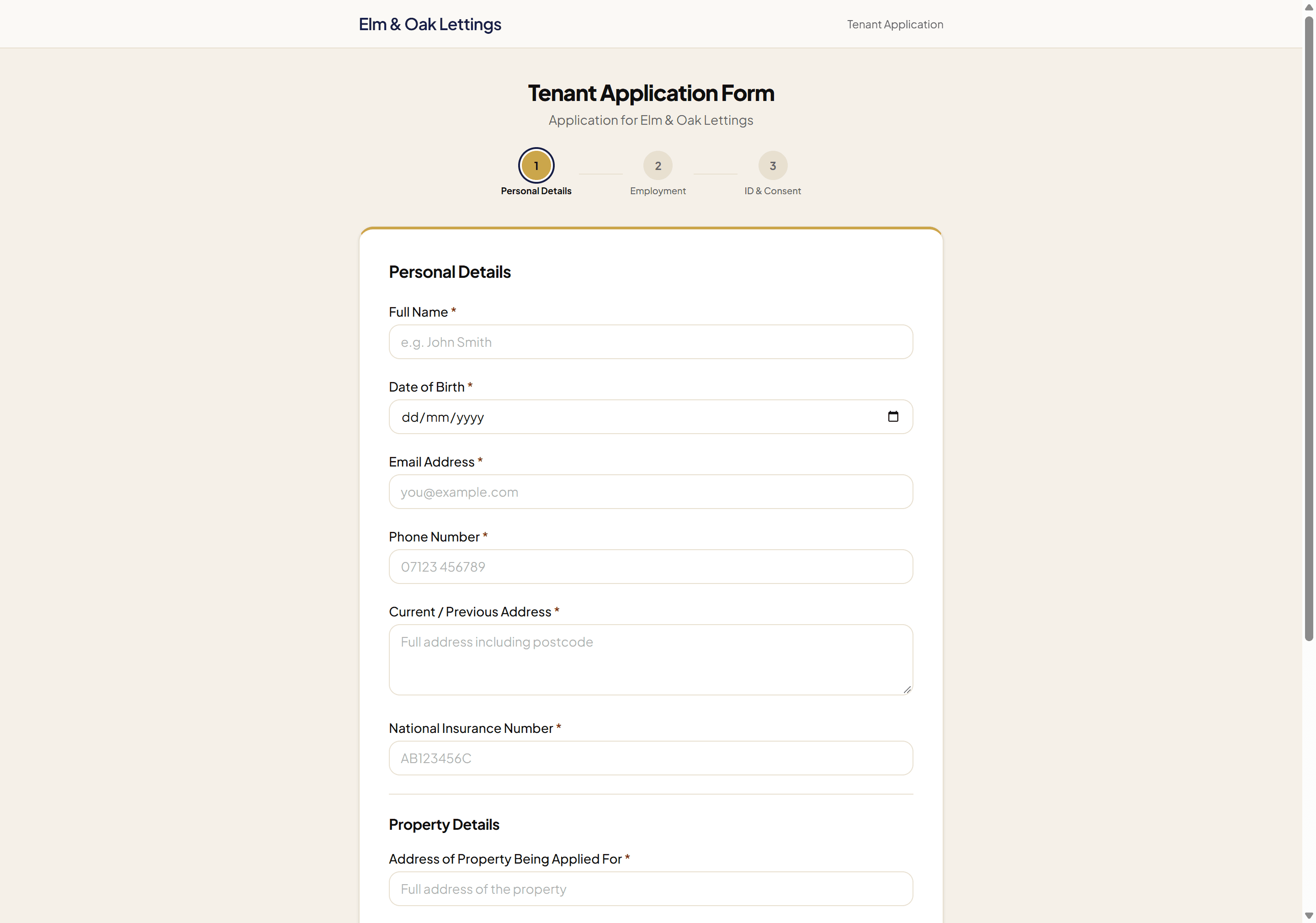
They complete three short steps on their own device — personal details, employment and income, then ID and consent. ID documents upload to encrypted storage, and GDPR + credit-check consent is captured with timestamps.
4. Everything saves in the app — automatically
The moment they submit, a prospective-tenant contact is created with every field pre-filled and all documents attached, and the application lands in For Your Attention on your dashboard. Nothing to re-type, nothing to file by hand.
5. Reference them when you're ready (optional)
From the contact, order a credit check (£7) or a full reference (£17) in one click — pay-per-check, no subscription. A credit check can be back the same day once the applicant has completed their form; a full reference usually takes up to 7 working days. Capturing the application is free; you only pay if you choose to run a check.
What the tenant sees
When you share the link, the tenant lands on a clean, RentFig-branded form — three short steps, no account required:
Frequently asked questions
Does the tenant need a RentFig account to apply?
No. They open the link, fill in three short steps and submit — no signup, no password. The link is the only thing they need.
What information is captured and saved?
Personal details, employment and income, current/previous address and National Insurance number, plus uploaded ID and proof documents — all saved to an automatically-created prospective-tenant contact, with GDPR and credit-check consent recorded and timestamped.
Where do the uploaded documents go?
Straight into your organisation's private, encrypted storage with row-level access controls, attached to the contact and the application record. Only your team can see them.
Do I have to re-type anything?
No. The contact is created with every field pre-filled from the application, and the documents are attached automatically. That's the whole point — one link replaces chasing details over email and copying them into a spreadsheet.
Can I regenerate or deactivate the link?
Yes. From Settings → Applications you can regenerate the link at any time, which deactivates the previous one immediately.
Can I reference the tenant too?
Yes, whenever you're ready. From the created contact, order a credit check (£7) or a full reference (£17) — pay-per-check with no subscription, run by our UK referencing partner. (£9 and £19 are the prices on our public referencing tool for landlords without a RentFig account.) A credit check can be back the same day once the applicant has completed their form; a full reference usually takes up to 7 working days. Referencing is optional; capturing the application is free.
Disclaimer: Prices are current at the time of writing and may change. This guide is general information, not legal advice.