
Repairs and contractors, without the chasing.
RentFig turns every repair into a job with a response target, tells you which jobs need you and why, and keeps your contractors — their trades, areas, Gas Safe numbers and insurance — in one directory. Tenants report repairs through their portal, contractors update jobs in theirs, and the final cost can go straight into your accounts.
Jobs, response targets and contractor directory on every plan · contractor portal and emergency cover check from Starter · quotes by link on Business
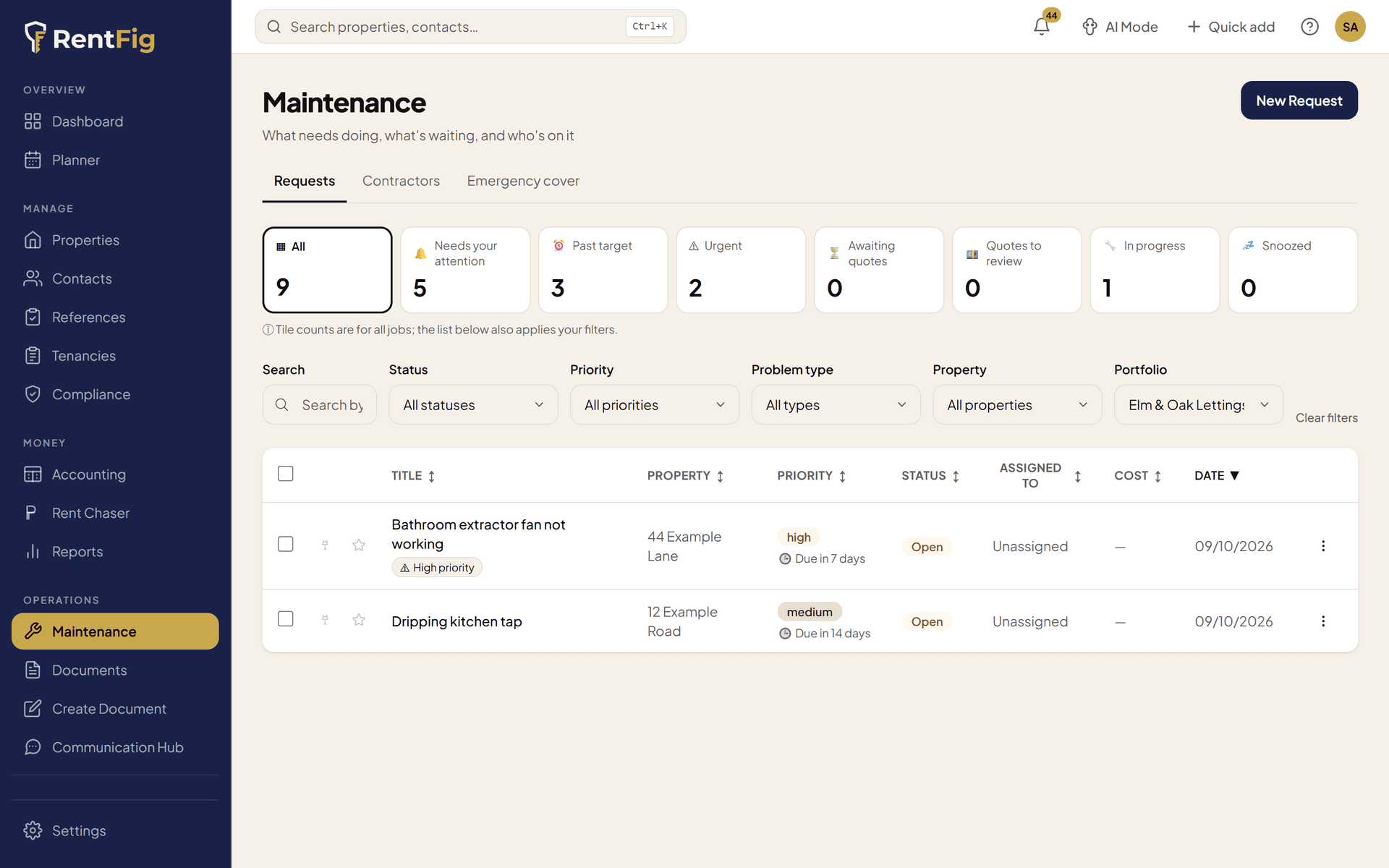
From report to fixed
Step 1: A repair comes in
The tenant reports it in their portal, or you log it yourself — with priority, problem type, trades needed and photos.
Step 2: It gets a target
Each priority has a response target, and RentFig warns you when a job is due soon or overdue.
Step 3: A contractor takes it
Send the job to a contractor from your directory, or on Business ask several for quotes by link and accept the best.
Step 4: Close it out
Record the final cost, add it to the property's history, and optionally post the bill into your accounts.
What you get
Jobs that say why they need you
Past target, urgent, nobody assigned after 2 days, no update in 14 days, an insurance claim still open — each job says why (and on Business, quotes waiting or a silent contractor). Snooze what can wait.
Response targets
Urgent 24 hours, high 7 days, routine 14 days, low 28 days — or your own target date. Shown as on track, due soon, overdue, met or missed, in words, with deadline emails.
Contractor directory
Trades, postcode districts or a radius, Gas Safe and electrical registration, insurance expiry and day rate — with past and open job counts, and the best matches suggested when you assign a job.
Contractor portal
From Starter, add contractors to your team and they get their own portal to see assigned jobs, update status, upload photos, add notes and request payment. You choose what they can see — including key-safe codes, with every view logged.
Quotes by magic link
On Business, ask several contractors to quote — no account needed. Counter, accept or decline; accepting assigns the job and pre-fills the cost.
Property history hints
As you log a repair, RentFig flags repeat faults, recent fixes, open follow-ups, items under warranty and certificates due at that property.
Emergency cover check
From Starter, save your home emergency cover terms and RentFig flags jobs the cover may pay for, with the details your insurer will ask for — and lets you log the claim against the job.
Costs into your books
Completing a job can record the bill in Accounting under repairs and maintenance, and the spend and response report shows cost by property and contractor.
Tenant updates
Optionally email the tenant who reported the repair each time the job moves on — and give them your emergency guidance in their portal.
What it doesn't do
- Response targets are modelled on Awaab's Law timescales, but the legal timescales for private landlords haven't been set yet — treat them as a guide, and act faster on anything dangerous.
- It doesn't pay contractors. A contractor can request payment, and you settle it yourself.
- It doesn't book appointments — the contractor arranges access with the tenant.
- Tenants can't upload photos in the portal, and updates to tenants are by email only.
- It doesn't find new tradespeople; suggestions rank the contractors you've already added.
Frequently asked questions
How do tenants report repairs?
Through their tenant portal: they describe the problem and its urgency, can pick an emergency issue type to see your emergency guidance, and can see the repairs they've reported. You get an email for each new report.
Do contractors need a RentFig account?
Not to quote: on Business, each contractor gets a magic link to quote, with no account. On any plan you can email a job straight to a contractor. To use the contractor portal — see assigned jobs, update status, upload photos and request payment — you add them to your team with the Contractor role, which uses a team seat, so it starts on Starter.
Is RentFig Awaab's Law compliant?
RentFig can't make you compliant on its own. Its response targets are modelled on Awaab's Law timescales and it warns you before jobs go overdue, but the legal timescales for private landlords haven't been set yet. Use the targets as a guide and act faster on anything dangerous.
Which plan includes maintenance?
Jobs, response targets, the dashboard, the contractor directory with suggested matches, history hints and posting costs to Accounting are on every plan. The contractor portal (which needs a team seat), the emergency cover check and the maintenance spend report start on Starter. Quotes by magic link and AI-written job briefs are on Business.
Can I see what repairs have cost per property?
Yes. Each job records its cost, and the Maintenance Spend & Response report (Starter and above) shows spend by property and by contractor and how quickly jobs were handled, with a CSV export.
Related
Compliance tracking
Gas, EICR and EPC renewals with reminders
Accounting & reports
Repair bills flow into your books
HMO management
Jobs per room, licensing and fire logs
Email forwarding
Forward a repair email and it becomes a job (Business)
Renters' Rights Act
What's changing for landlords, including repairs
Pricing
What each plan includes
Stop chasing repairs by text.
Every job, contractor and cost in one place — with a clear list of what needs you today.