
Stop chasing rent manually. Let RentFig escalate for you.
Automated rent reminders that start friendly and escalate firmly, with full control over every tenancy. Regular chasing by email on Starter, the full Chaser and Critical escalation on Standard and above, and optional SMS on Business.
Free plan, no card needed · Rent chasing from the Starter plan (£9/month)
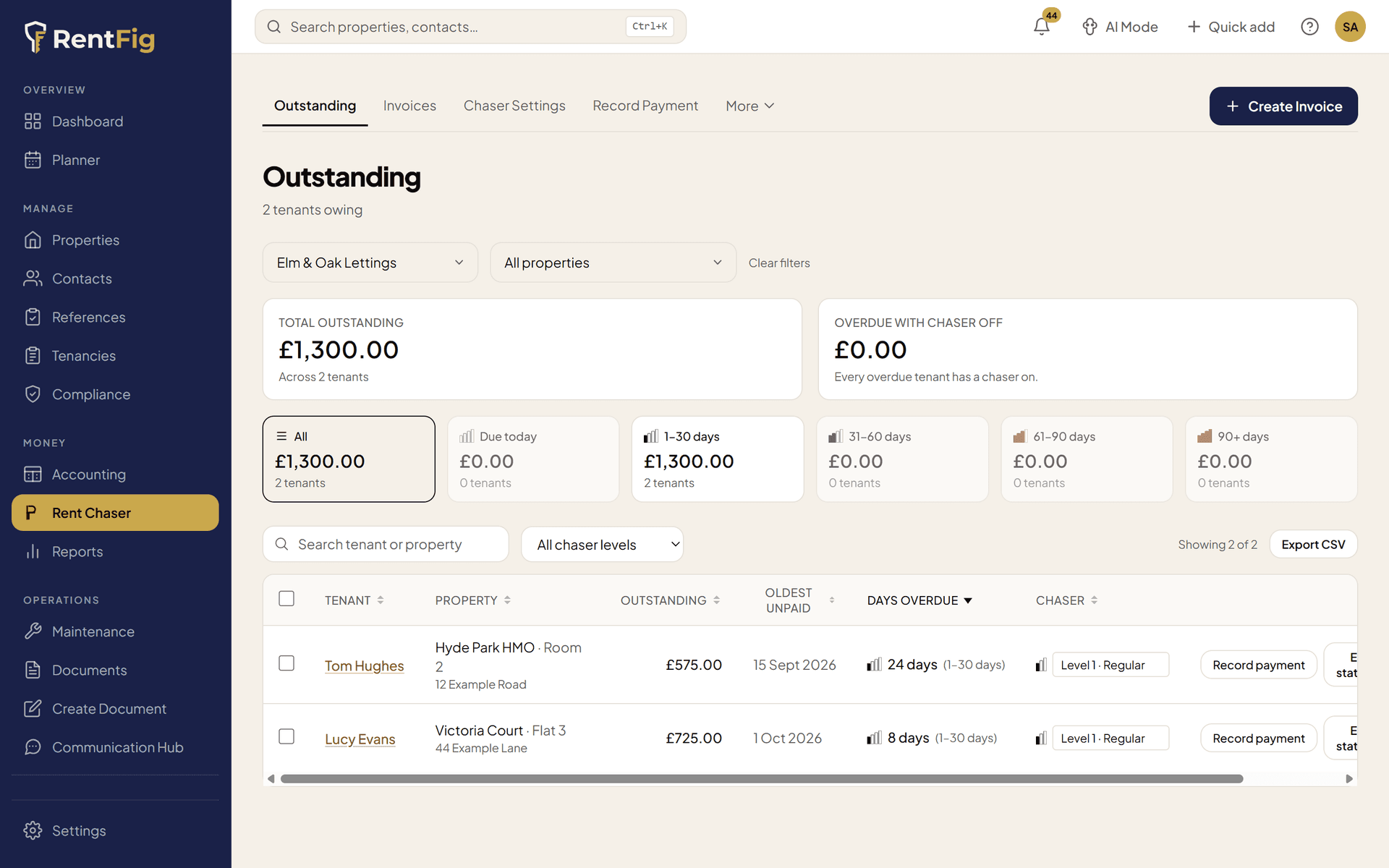
Four tiers, four escalation levels
Set each tenancy to None, Regular, Chaser, or Critical — each tier sends progressively firmer messages on a fixed schedule.
Email and SMS channels
Chase by email as standard, or add SMS on the Business plan — each reminder level can use a different channel depending on how urgent the situation is.
Auto-clears when rent is paid
When a tenancy balance reaches zero RentFig can automatically downgrade the chasing tier — no manual housekeeping required.
Outstanding Rent
See every overdue balance across your whole portfolio
- All tenancies with an outstanding balance surfaced in one view
- Days overdue, amount owed, and property address at a glance
- Filter by property, tenant, or overdue status
- Direct link to the tenancy record from each row
Chasing Tiers
Escalate automatically — from friendly reminder to final notice
- Four tiers: None, Regular, Chaser, Critical
- Four escalation levels: Friendly Reminder, Firm Reminder, Urgent Notice, Final Notice
- Each tier runs on a fixed schedule — set it once, messages go out automatically
- Full chasing log showing every message sent, when, and to whom
Pause & Resume
Pause chasing for any tenancy with a single date picker
- Set a pause-until date — chasing resumes automatically after that date
- Useful for payment plans, disputes, or agreed grace periods
- Pause is per-tenancy — other tenancies keep chasing unaffected
- Paused-until date shown in the active chasing rules table
Invoices & Statements
Auto-generate invoices and produce tenant statements in seconds
- Generate rent invoices automatically at the start of each billing period
- Manual invoice creation for ad-hoc charges
- Apply credit notes against outstanding invoices
- One-click tenant statement showing all invoices, payments, and balance
Four chasing tiers — pick the right intensity per tenancy
Not every tenant needs the same approach. Assign each tenancy its own tier and RentFig handles the rest.
None
Chasing disabled for this tenancy.
No messages sent
Regular
Gentle nudges for tenants who occasionally pay late.
- 1Friendly Reminder
- 2Firm Reminder
Chaser
Firm escalation for persistent late payers.
- 1Friendly Reminder
- 2Firm Reminder
- 3Urgent Notice
Critical
Full escalation sequence for serious arrears.
- 1Friendly Reminder
- 2Firm Reminder
- 3Urgent Notice
- 4Final Notice
Chase by email, SMS, or both
Reminders go by email as standard; SMS is optional and available on the Business plan. Different tenants respond to different channels, so you can mix and match per reminder level.
- Sent from your RentFig branded address
- Full message body with invoice reference and amount
- Logged in the chasing log with sent/failed status
- Ideal for Friendly and Firm Reminder levels
SMS
- Delivered directly to the tenant's mobile
- Short, direct message with outstanding amount
- Higher open rates than email for urgent notices
- Best used for Urgent Notice and Final Notice levels
Everything else built into rent chasing
Beyond the automated reminders, RentFig handles the rest of rent tracking and chasing.
Section 8 early warnings
RentFig flags tenancies that have reached significant arrears and may qualify for a Section 8 notice — so you know before you have to ask.
Auto-downgrade on clearance
Toggle a portfolio-wide setting so that when a tenancy's balance hits zero the chasing tier drops back to None automatically — no manual clean-up.
Match bank payments to rent
In Reconcile Rent, match incoming bank payments to the right rent invoices. You review and confirm every match, and anything unmatched stays flagged.
Debt tracker
Log outstanding debt records per tenant with original amount, outstanding balance, and status. Add progress notes and record payments against each record.
CSV payment import
Upload a bank export and RentFig matches each transaction to the correct tenancy. Review unmatched rows before confirming, so nothing is applied in error.
Credit notes
Issue credit notes for overpayments or adjustments and apply them directly to outstanding invoices. Unapplied balances carry forward to offset future invoices.
Frequently asked questions
What are chasing tiers?
Tiers control how aggressively RentFig chases a tenancy. None disables chasing. Regular sends gentle reminders and is available from the Starter plan. Chaser escalates to urgent messages and Critical runs the full four-level sequence including a Final Notice; both need the Standard plan or above.
How do the four escalation levels work?
Each tier runs a scheduled sequence: Friendly Reminder, Firm Reminder, Urgent Notice, and Final Notice. Regular stops after two levels; Chaser uses three; Critical uses all four. Messages are sent automatically on a fixed cadence after rent becomes overdue.
Can I chase by SMS as well as email?
Yes, on the Business plan, if you want to — SMS is optional and email is the default. Each reminder level can be sent via email, SMS, or both. SMS is useful for tenants who rarely check email, and critical tiers can use both channels in sequence.
What does pausing chasing do?
Setting a pause-until date stops all automated messages for that tenancy until the date you choose. Useful during payment plan negotiations or if the tenant has agreed to pay on a specific date. Chasing resumes automatically — you do not need to remember to re-enable it.
What triggers a Section 8 warning?
RentFig flags assured tenancies whose rent arrears appear to reach the Ground 8 level for a Section 8 Notice (three months' rent in England, raised from two months by the Renters' Rights Act 2025). Only rent invoices count; other charges such as insurance, utilities or damages are left out, and licences, company lets and commercial leases aren't flagged. For rent paid quarterly or yearly, the law now treats the rent periods as monthly (from 1 May 2026), so RentFig compares the arrears with three months' rent at the monthly equivalent. The warning appears on the Chaser page as an advisory flag, not legal advice, so you can look into it and take advice before serving any notice.
What is the debt tracker for?
The debt tracker is for historical or non-rent debt — arrears from a previous tenancy, court-awarded amounts, or outstanding charges. You log the original amount, record partial payments against it, add progress notes, and mark it settled or written off when resolved.
Ready to switch it on? Read the step-by-step setup guide
Arrears reached Ground 8? The possession tracker helps you prepare a Section 8 notice and track the case.
Stop sending the same email every month.
Set a chasing tier per tenancy and let RentFig handle the reminders — from friendly nudge to final notice.