
Landlord accounts, done as you go.
Rent, expenses and receipts flow in on their own. RentFig keeps a full set of HMRC-ready figures and every report your accountant asks for — without the spreadsheet, and with barely any typing.
Accounting reports on every paid plan · bank feeds and reconciliation on Standard and Business
Barely any typing
Receipts file themselves from a photo, incoming rent matches to invoices, and your bank rules categorise the rest — so the books keep themselves up to date.
Every report, three ways
Profit & loss, balance sheet, rent roll, cash flow and more — each exportable as PDF, CSV or Excel, plus a one-click Year-End Pack for your accountant.
HMRC-ready by design
Every expense is mapped to the SA105 boxes, the Section 24 finance-cost restriction is worked out for you, and the right tax form is picked for your structure.
 Reference: E1Q7PL
Send your quarterly updates to HMRC straight from the app. How MTD works in RentFig
Reports
Your whole portfolio's numbers, at a glance
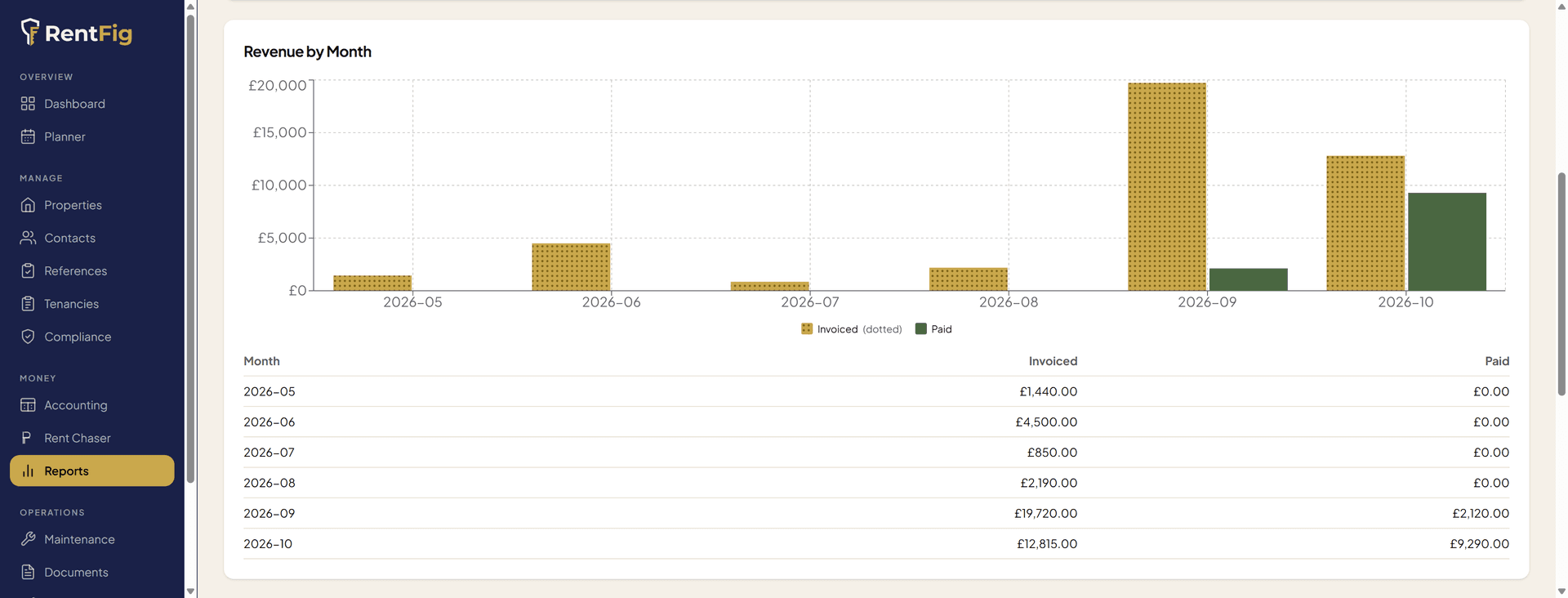
- Revenue by month — invoiced versus actually paid, side by side
- Profit & loss by month, with income, expenses and net at a glance
- Collection rate — paid, outstanding and overdue across the portfolio
- Occupancy across every property and room, in one view
Profit & Loss
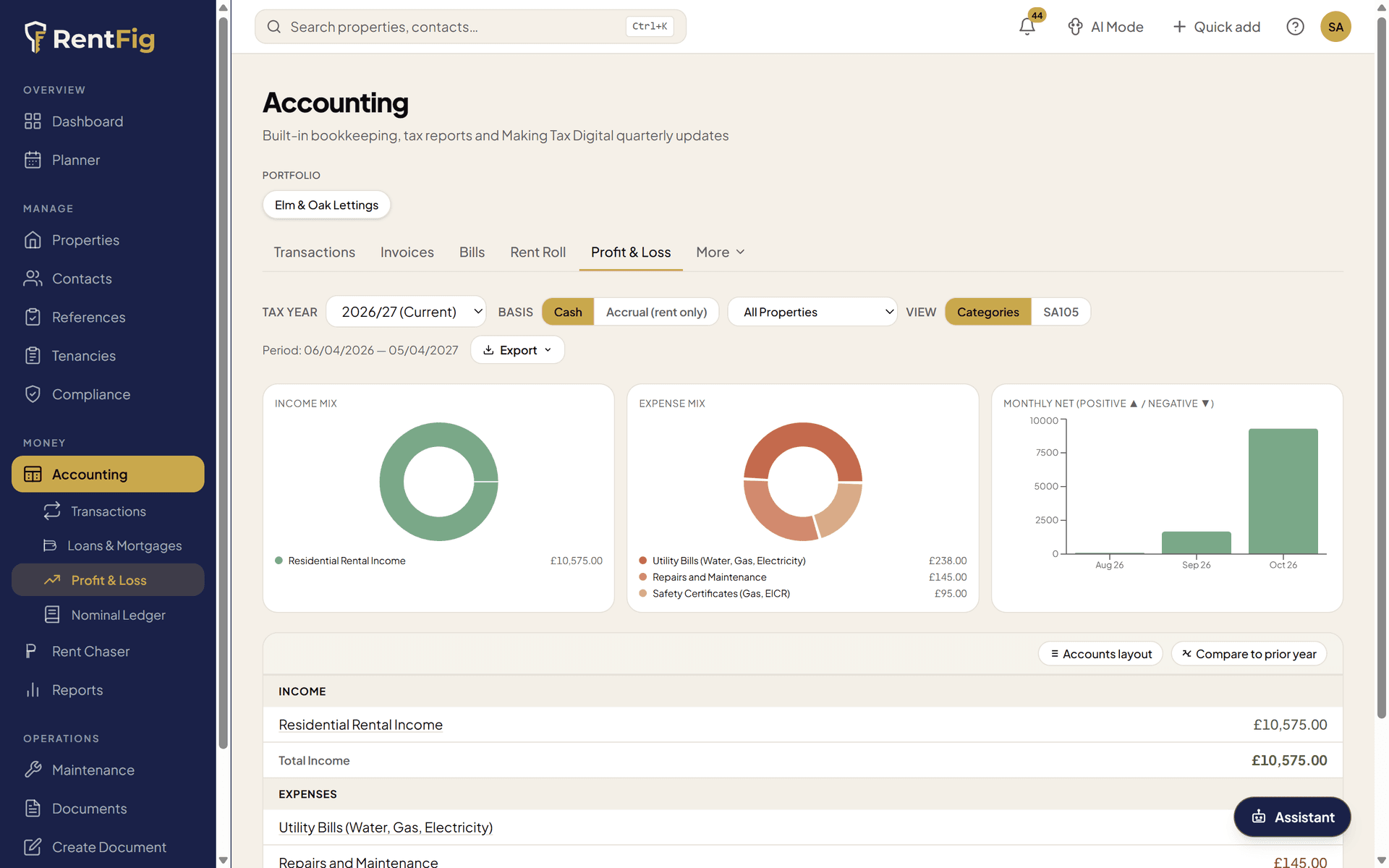
Income, expenses and net profit — month by month
- Income and expenses side by side each month, with your net profit as a running line
- 12-month income, expenses and net-profit totals across the top
- Filter to a single portfolio or property in a click
- Cash or accrual basis on the full accounting page — for any tax year
Self Assessment (SA105)
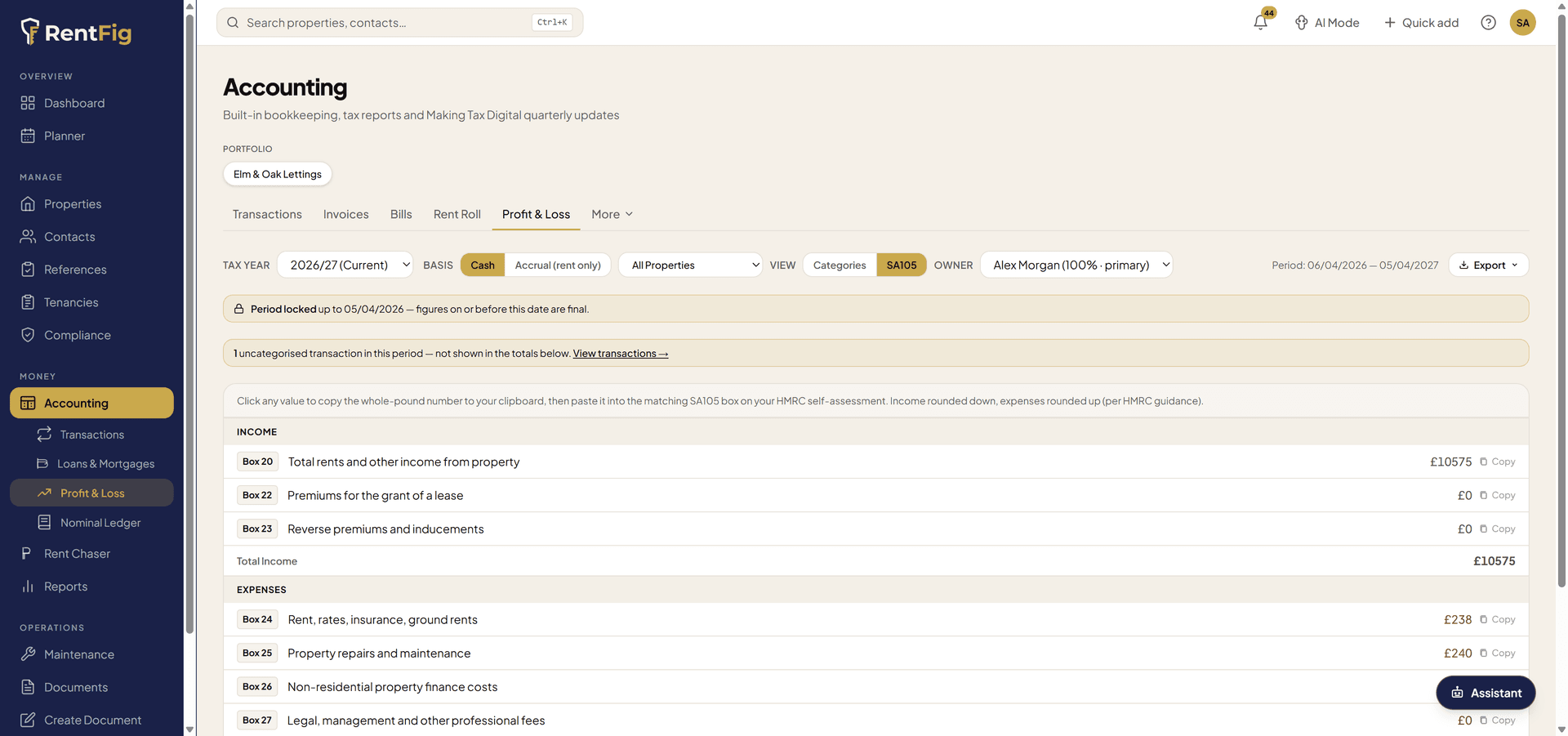
Your SA105 figures, filled in for you
- Every figure mapped to its numbered SA105 box — ready to copy across
- The Section 24 finance-cost restriction (Box 44) and 20% reducer worked out
- Click any box to copy the figure straight into your HMRC return
- Partnership (SA800), trust (SA900) and company (CT600) forms too, by structure
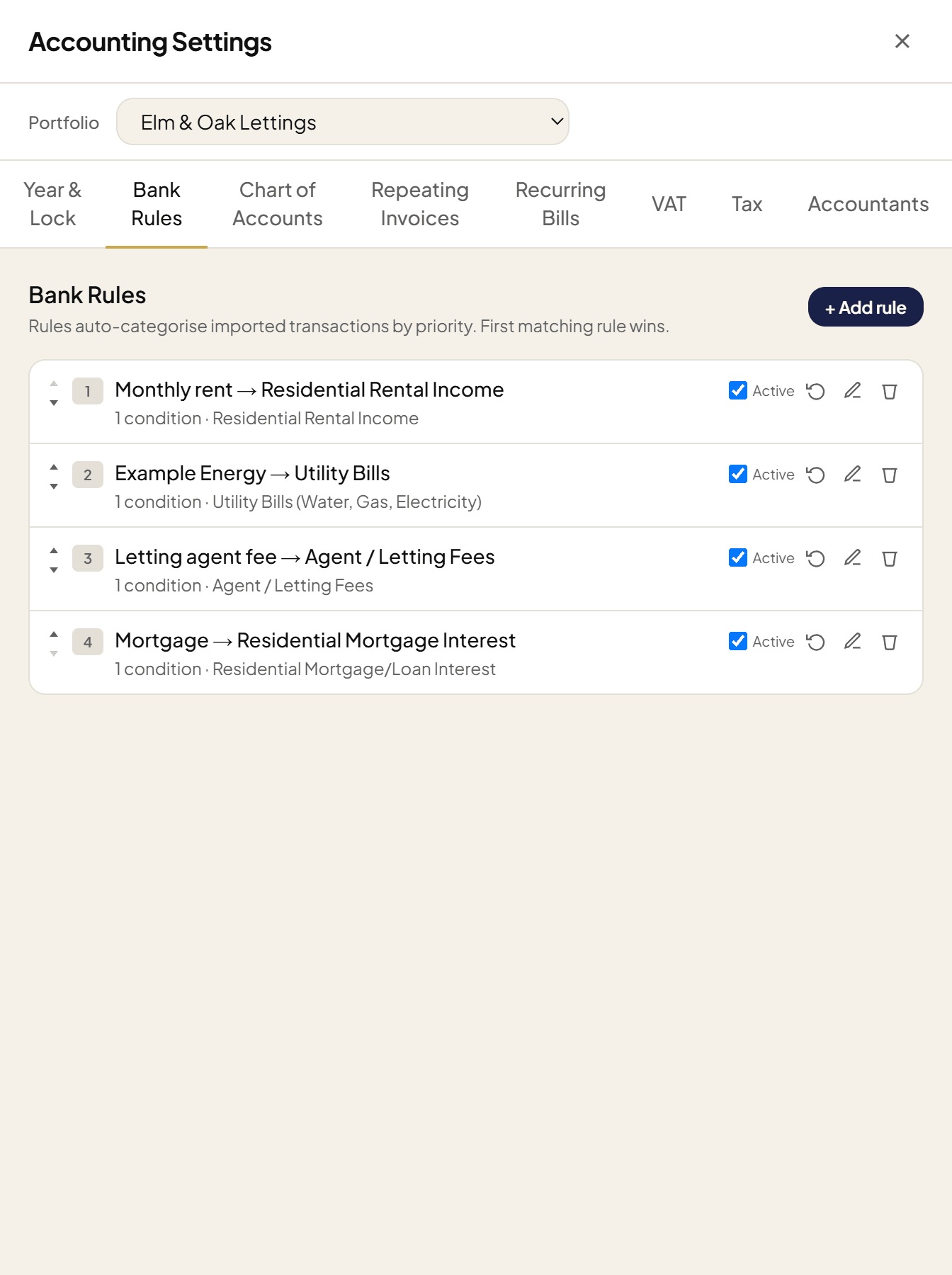
Bank rules & suggestions
Categorise once — RentFig does the rest
- Import a bank statement, or connect a feed, and transactions flow in
- Rules match by description, amount or direction and categorise on import
- Smart suggestions from your own history when no rule applies
- Split a single payment across several properties or categories
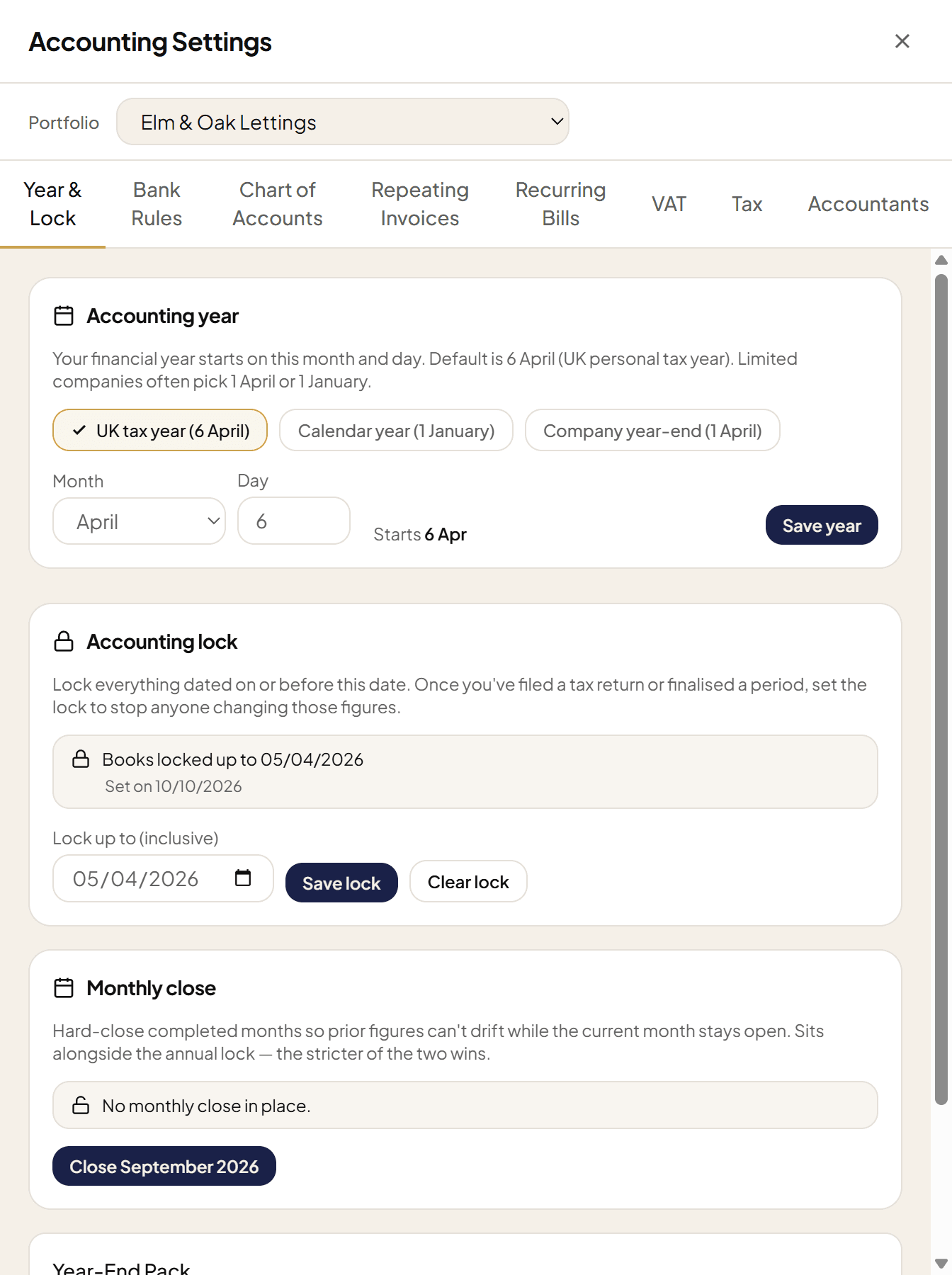
Accounting lock
Lock the year once it's filed
- Set a lock date and everything on or before it becomes final
- Filed last year's return? Lock it so the figures can't drift
- Only the account owner can move the lock back or clear it
- A clear 'books locked up to' badge shows on your reports
Every report a landlord — and their accountant — needs
Run any of these for any period and property, then export as PDF, CSV or Excel. The Year-End Pack bundles them all in one download.
The books mostly keep themselves
The whole point of RentFig's accounting is how little you touch it. Here's what runs without you.
Receipt scanning (AI)
Photograph a receipt — on your phone, over WhatsApp, or by forwarding the email — and RentFig reads the supplier, date, total and VAT and files it against the right transaction.
Bank rules
Write a rule once — 'anything from British Gas → Utilities' — and every matching transaction is categorised automatically on import, with priorities and splits when you need them.
Rent matched automatically
Incoming rent is matched to the open invoice for that tenancy, so payments reconcile themselves and your arrears figures stay right without any manual ticking-off.
Smart suggestions
When no rule fits, RentFig suggests a category from how you've treated similar payments before — so even the odd one-off is a single click, not a decision.
Recurring expenses
Set up the costs that repeat — mortgage interest, insurance, a management fee — and they post on schedule, so nothing regular is ever forgotten at year end.
Ask the AI assistant
Prefer to just ask? On WhatsApp or in-app: 'what's my profit and loss this year?' — and the figure comes straight back from your own numbers.
The right tax figures for how you hold your property
RentFig knows whether you're an individual, a partnership, a trust or a company, and prepares the figures for the matching form.
SA105
Individual landlords
UK property pages of your Self Assessment
SA800
Partnerships
Partnership return, split across partners
SA900
Trusts
Trust & estate return figures
CT600
Limited companies
Company tax return property figures
Frequently asked questions
Does RentFig file my tax return for me?
RentFig does not file your annual Self Assessment. It keeps your figures HMRC-ready and maps them to the correct boxes (for example the SA105 property pages). On eligible plans it can also send your Making Tax Digital quarterly updates to HMRC directly, after you confirm each one with two-factor authentication; you remain responsible for checking the figures before they are sent.
What is the SA105 view?
SA105 is the UK property supplementary page of the Self Assessment tax return. RentFig totals your income and expenses for the tax year, maps each total to its numbered SA105 box, and lets you click a box to copy the figure across. The Section 24 residential finance-cost restriction (Box 44) and the 20% basic-rate reducer are worked out for you.
Do I have to categorise every transaction by hand?
No. Bank rules categorise matching transactions automatically the moment they import — you write a rule once. When no rule applies, RentFig suggests a category based on how you've treated similar payments before, so it's usually a single click. You stay in control and can override anything.
Can I export everything for my accountant?
Yes. Every report — profit & loss, balance sheet, trial balance, nominal ledger, cash flow, aged debtors and creditors, rent roll and more — exports as PDF, CSV or Excel. There's also a one-click Year-End Pack that bundles the lot.
What does the accounting lock do?
You set a lock date, and every record dated on or before it becomes final and can't be edited — useful once you've filed a return or finalised a period. Only the account owner can move the lock back or clear it, and your reports show a 'books locked up to' badge.
Does the AI really read my receipts?
Yes. Photograph a receipt (or send it on WhatsApp, or forward the email) and RentFig reads the supplier, date, total and VAT from it, then attaches it to the matching transaction. You review the extracted details before anything is saved — nothing is filed without your confirmation.
Cash basis or accrual — which does it use?
Both. Cash basis is HMRC's default for most individual landlords and is what RentFig uses out of the box, but you can switch a portfolio to the accruals (traditional) basis for the profit & loss and tax figures.
Which plans include accounting and reports?
The accounting reports — profit & loss, balance sheet, trial balance, cash flow, aged debtors and creditors, rent roll and the tax-form views — are on every paid plan, from Starter up. Bank import, bank rules, reconciliation and live bank feeds are on the Standard and Business plans. Receipt capture and rent tracking are part of everyday use across plans.
Want the monthly routine? Read the 10-minute monthly money check
Stop rebuilding your accounts every January.
Let the rent, receipts and expenses flow in all year — and open a finished set of figures when you need them.