
MTD software for landlords, built into your rent and expenses.
RentFig is HMRC-recognised Making Tax Digital software for UK landlords. Your rent, expenses and receipts become your digital records as you go, and each quarter you check the figures and send the update straight to HMRC — with co-owners filing their own share. Included on every paid plan, from £9 a month.
Quarterly updates for your UK property business · Starter, Standard and Business plans
 Reference: E1Q7PL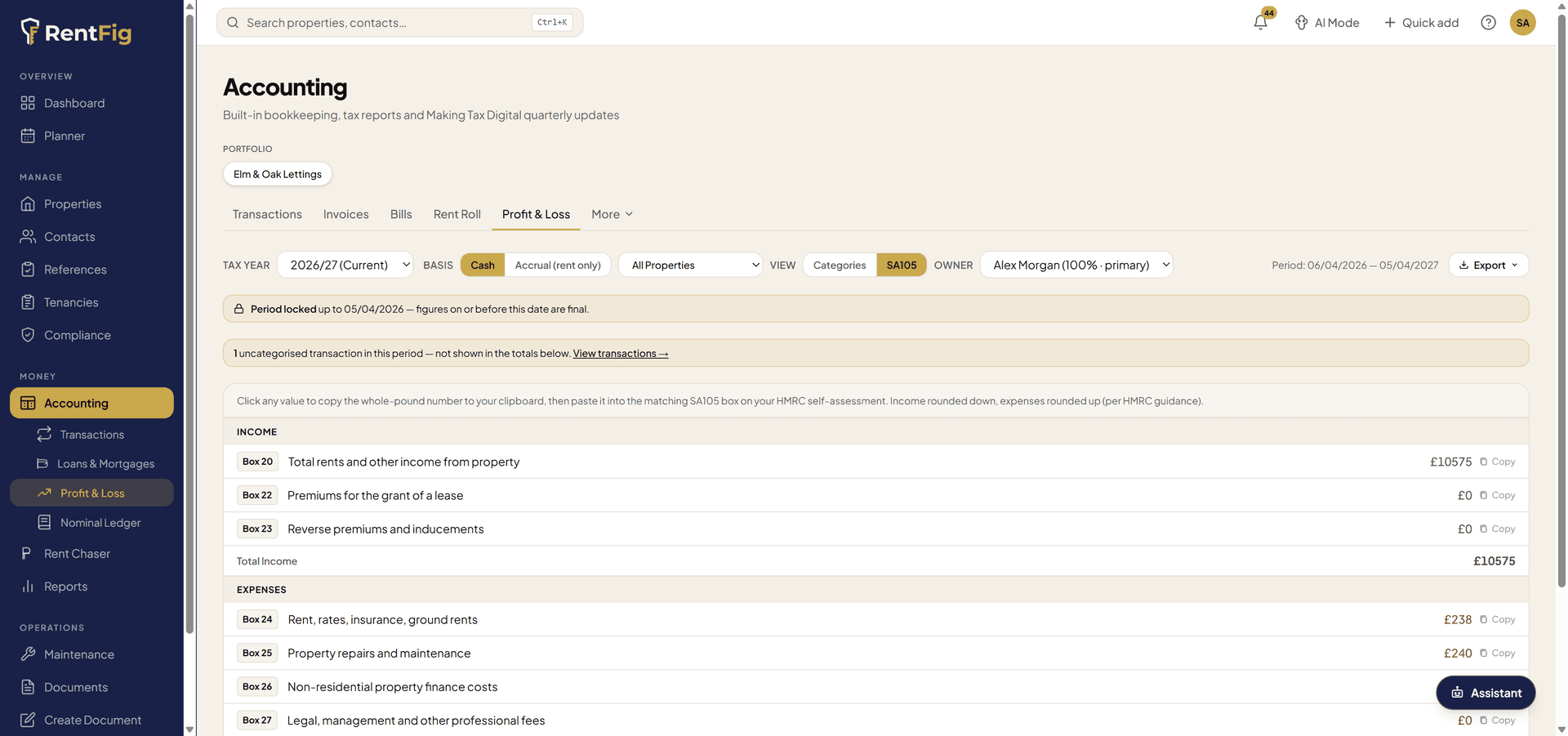
Do you need MTD software?
Making Tax Digital for Income Tax applies when your qualifying income — gross rent plus any self-employment turnover, before expenses — goes over the threshold. Jointly owned property counts towards each owner's own share.
| From | If qualifying income is over |
|---|---|
| 6 April 2026 | £50,000 |
| 6 April 2027 | £30,000 |
| 6 April 2028 | £20,000 |
Property held in a limited company isn't in MTD for Income Tax. More detail in our MTD for landlords guide.
How sending an MTD update works in RentFig
Step 1: Your records keep themselves
Rent, expenses and receipts go into RentFig as you go — receipts file themselves from a photo, and on Standard and Business your bank feed and bank rules do the categorising. Those are your MTD digital records, by property.
Step 2: Connect to HMRC once
Sign in with your own HMRC details from inside RentFig and enter your National Insurance number. Your National Insurance number is stored encrypted, and you can disconnect at any time.
Step 3: Check the quarter's figures
When an update period ends, RentFig shows the year-to-date income and expenses HMRC expects, grouped into HMRC's categories, so you can review them before anything is sent.
Step 4: Confirm and send
Confirm with your two-factor code and RentFig sends the update straight to HMRC. You get HMRC's acknowledgement, and the period is locked so the figures can't drift afterwards.
Made for how landlords actually own property
Joint owners file their own share
Own property with a partner or family member? Each co-owner files their own share under their own HMRC login — the account holder prepares the quarter, the co-owner reviews and sends it.
Reminders before every deadline
An email when each update period ends and another five days before the deadline, plus a dashboard item until the update is done.
Year-to-date, the way HMRC wants it
Each quarterly update covers the tax year so far, not just the last three months. RentFig works out the cumulative figures for you.
SA105 and Section 24 worked out
Every expense maps to its SA105 box, and mortgage interest is handled as the Section 24 finance-cost restriction rather than an expense.
Two-factor protection
Nothing goes to HMRC without a fresh two-factor code from the person filing, and only the owner or someone with full accounting access can connect HMRC.
Prefer a bridging tool?
Download any period as a CSV for your bridging software or accountant instead of sending it from RentFig.
MTD quarterly update deadlines
Each update covers the tax year so far, not just the last three months. HMRC isn't giving penalty points for late quarterly updates in the 2026/27 tax year, but it will from 2027/28.
| Update covers | Send it by |
|---|---|
| 6 April to 5 July | 7 August |
| 6 April to 5 October | 7 November |
| 6 April to 5 January | 7 February |
| 6 April to 5 April | 7 May |
Calendar update periods and the full calendar are in our MTD quarterly deadlines guide.
What RentFig does — and doesn't — file
- Sends: your quarterly updates for your UK property business, straight to HMRC.
- Prepares: your SA105 figures, with Section 24 worked out, ready for your year-end return.
- Not yet: the end-of-year final declaration. Use other HMRC-recognised software or your accountant for that step — see GOV.UK's software finder.
You stay responsible for checking the figures before they're sent. RentFig keeps the records and does the sums; it isn't tax advice.
MTD software: frequently asked questions
Is RentFig recognised by HMRC for Making Tax Digital?
Yes. RentFig is recognised by HMRC as MTD-ready software for Making Tax Digital for Income Tax (HMRC reference E1Q7PL) and appears in GOV.UK's software finder. It sends quarterly updates for your UK property business straight to HMRC.
Do I need MTD software as a landlord?
If your qualifying income — gross rent plus any self-employment turnover, before expenses — was over £50,000, you've had to use MTD for Income Tax since 6 April 2026. The threshold drops to £30,000 from April 2027 and £20,000 from April 2028. Jointly owned property counts towards each owner's own share. Limited companies are not in MTD for Income Tax.
How much does RentFig's MTD software cost?
Sending quarterly updates to HMRC is included on every paid plan at no extra cost for now: Starter is £9 a month (or £84 a year) for up to 10 tenancies, with Standard and Business for bigger portfolios. New accounts get a 1-month free trial of the full product.
When are MTD quarterly updates due?
For the standard update periods: 7 August, 7 November, 7 February and 7 May. Each update covers the tax year so far — for example the 7 November update covers 6 April to 5 October. HMRC isn't giving penalty points for late quarterly updates in the 2026/27 tax year, but it will from 2027/28.
Can joint owners use RentFig for MTD?
Yes. HMRC treats each owner as a separate taxpayer, so each co-owner files their own share under their own HMRC login. In RentFig the account holder prepares the quarter, and each co-owner gets their own simple sign-in to review and send their share.
Does RentFig do the end-of-year final declaration?
Not yet. RentFig sends your quarterly updates and keeps your figures mapped to the SA105 boxes, but the end-of-year final declaration (due 31 January after the tax year) isn't in RentFig yet. Use other HMRC-recognised software or your accountant for that step.
Is my rental income from a limited company covered?
No — and it doesn't need to be. MTD for Income Tax only applies to individuals. Property held in a limited company files a company tax return instead. RentFig still keeps the company's accounts and CT600 figures.
Can my accountant still file for me?
Yes. You can send the updates yourself from RentFig, or export any period as a CSV for your accountant or a bridging tool. Your accountant can also use RentFig's reports and Year-End Pack.
What do I need to connect RentFig to HMRC?
You need to be signed up for Making Tax Digital for Income Tax with HMRC, your HMRC sign-in details and your National Insurance number. You'll also need two-factor authentication turned on in RentFig before you can send an update.
The rest of the books: see RentFig's accounting and reports
Make your next quarterly update the easy one.
Keep the records as you go, and send the update in minutes when the quarter ends.